Exporting data
What’s in this document?
Data can be exported in several ways and formats.
JSON-LD and NDJSON-LD export forms
To export flattened, framed, or compacted document forms, you should also provide a context, a frame, or both as a file or a link. Use the graphdb.jsonld.whitelist GraphDB configuration property inside the graphdb.properties config file to provide a whitelist with URLs that are permitted for JSON-LD and NDJSON-LD processing.
The whitelist is a comma-separated list of URLs. The wildcard (*) allows for fine-grained control, enabling administrators to specify a set of URLs, including entire directories. Each entry in the list represents a source that is considered safe for JSON-LD operations.
# Sets whitelist for JSON-LD and NDJSON-LD resources
graphdb.jsonld.whitelist = https://example.com/my/jsonld/*, file:///usr/local/my/jsonld/*
Note
A pop-up for selecting the form appears when exporting to JSON-LD or NDJSON-LD from Workbench. If you’ve selected flattened or compacted forms, a field for providing an address or file path to the context also appears. When a framed form is selected, a field for the path to the frame will appear instead.
Exporting a repository
Go to .
Click Export repository and then select the serialization to use for the exported file.

Exporting individual graphs
Go to .
A list of contexts (graphs) in a repository is displayed. You can also search for particular graphs from the search field at the top of the screen.
After you click the checkboxes of one or more listed graphs, clicking Export selected graphs
 will prompt you to indicate a serialization format and then save a file in that format with the selected graphs.
To export a single graph, click the Export graph icon on the right side of its row on the display. To export multiple graphs, click their check boxes on the left to select them click the Export selected graphs icon at the top of the list.

Exporting query results
You can export SPARQL query results from the SPARQL view by clicking the Download As button on the right side of the screen. The list of export formats will be RDF serializations after you execute a CONSTRUCT query or JSON, XML, CSV, and TSV formats after executing a SELECT query.
Exporting resources
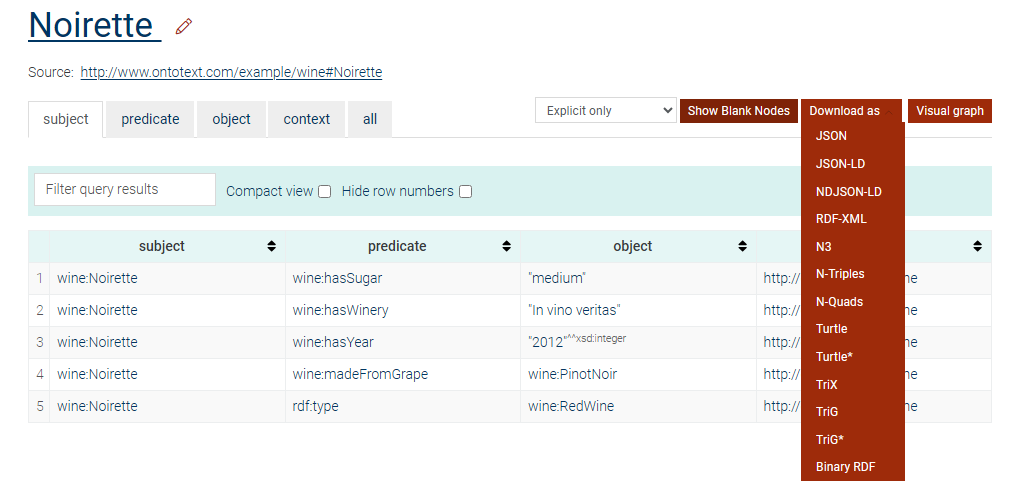
After finding a resource from the View resource on GraphDB’s home page, you can download its RDF triples in a format of your choice by clicking the Download As button on the right side of the screen:
Exporting via HTTP with curl
Using the curl command line utility lets you take advantage of GraphDB’s RDF4J REST API to export repository data and queries from your operating system command line.
Request headers
Accept: Relevant values forGETrequests are the MIME types of the supported RDF formats.Content-Type: When exporting graph queries, used to specify the encoding of any request data sent to a server. Relevant values are theMIMEtypes of the supported RDF formats.Link: Used only when exporting to JSON-LD or NDJSON-LD document form. When importing or exporting to compacted or flattened JSON-LD or NDJSON-LD document form, address or file path of context. When exporting to framed JSON-LD or NDJSON-LD document form, address or file path of frame that should be used by the Framing processor.
If a link is not provided when exporting to the JSON-LD or NDJSON serializations:
Exporting to compacted JSON-LD / NDJSON-LD document form — exported data will use the namespaces of the repository instead.
Exporting to flattened JSON-LD / NDJSON-LD document form — exported data will not contain context.
Exporting to framed JSON-LD / NDJSON-LD document form — exported data will be exported to expanded JSON-LD or NDJSON-LD document form instead.
Fetch statements from repository
GET /repositories/<repo_id>/statements
Example:
curl '<base_url>/repositories/<repo_id>/statements' --header 'Accept: <MIME-type>/<MIME-subtype>'
Export JSON-LD using context example:
curl '<base_url>/repositories/<repo_id>/statements' \
--header 'Accept: application/ld+json; profile=http://www.w3.org/ns/json-ld#<type-of-mode>' \
--header 'Link: <link_to_the_context_location>; rel="http://www.w3.org/ns/json-ld#context"'
Warning
The link to the context or frame location must be surrounded by angle brackets <>. From the example above, replace only link_to_the_context_location with your link.
The following example would not work:
--header 'Link: http://localhost:7200/json-ld-11/context.jsonld; rel="http://www.w3.org/ns/json-ld#context"'
Instead, it should be written like this:
--header 'Link: <http://localhost:7200/json-ld-11/context.jsonld>; rel="http://www.w3.org/ns/json-ld#context"'
Export JSON-LD using frame example:
curl '<base_url>/repositories/<repo_id>/statements' \
--header 'Accept: application/ld+json;profile=http://www.w3.org/ns/json-ld#framed' \
--header 'Link: <link_to_the_frame_location>; rel="http://www.w3.org/ns/json-ld#frame"'
Fetch queries from repository
GET /repositories/<repo_id>/
The query can be specified with --data-raw. It can also be provided with --data-urlencode query@/<path-to-query-file>
Example:
curl '<base_url>/repositories/<repo_id>' \
--header 'Content-Type: application/x-www-form-urlencoded; charset=UTF-8' \
--header 'Accept: application/<MIME-type>' \
--data-raw $'query=<sparql-query>'
Export JSON-LD example:
curl '<base_url>/repositories/<repo_id>' \
--header 'Content-Type: application/x-www-form-urlencoded; charset=UTF-8' \
--header 'Accept: application/ld+json; profile=http://www.w3.org/ns/json-ld#<type-of-mode>' \
--header 'Link: <link_to_the_context_location>; rel="http://www.w3.org/ns/json-ld#context"' \
--data-raw $'query=<sparql-query>'
Warning
The link to the context or frame location must be surrounded by angle brackets <>. From the example above, replace only link_to_the_context_location with your link.
The following example would not work:
--header 'Link: http://localhost:7200/json-ld-11/context.jsonld; rel="http://www.w3.org/ns/json-ld#context"'
Instead, it should be written like this:
--header 'Link: <http://localhost:7200/json-ld-11/context.jsonld>; rel="http://www.w3.org/ns/json-ld#context"'
Configuring the JSON-LD writer properties
The JSON-LD writer has additional properties that configure how the writer operates:
Property name |
Description |
Default value |
|---|---|---|
|
Defines whether the writer will use JSON-LD 1.0 or JSON-LD 1.1 specifications when processing JSON-LD exports. |
|
|
Provides a path to a frame that is used when exporting to framed document form. |
|
|
Determines if IRIs are compacted relative to the base option or document location when compacting. |
|
|
Provides a path to a context that is used to expand the active context when expanding a document. |
|
|
If set to |
|
|
Indicates whether the output should be in explicit form.
When set to |
|
|
When set to |
|
|
Controls whether default values are omitted from the output. |
|
|
Controls whether the top-level graph is omitted from the output. |
|
|
Specifies whether all properties are considered as required. |
|
|
Allows the use of numeric values as |
|
|
Specifies whether URI validation is enabled. When set to
|
|