Accessing relational databases with data virtualization
What’s in this document?
Overview and features
GraphDB’s data virtualization capabilities enable direct access using SPARQL to relational databases, eliminating the need to replicate data. Data virtualization is a useful tool when working with highly dynamic data, as well as with data sources that are too big to replicate. Moreover, in practice it is easier not to copy data and accept all limitations such as data quality, integrity, and types of supported queries of the underlying information source.
A common scenario is to maintain a declarative mapping between the relational model and RDF, where the user periodically dumps all statements and writes them to a native RDF database so it can support property paths and faster data joins.
GraphDB’s relational virtualization implementation exposes a virtual SPARQL endpoint that translates the queries to SQL using declarative mapping. It achieves this through an integration with the open-source Ontop project, extended with multiple GraphDB-specific features.
GraphDB uses Ontop version 5.1.0. As of June 2023, Ontop supports the following database systems: PostgreSQL, MySQL, MariaDB (since 5.0.0), SQL Server, Oracle, DB2, Snowflake (since 5.0.0), Databricks (since 5.0.0), Google BigQuery (since 5.0.2), AWS Redshift (since 5.0.2) and DuckDB (since 5.0.2); and database federators such as Denodo, Dremio (since 4.1.0), Teiid (since 4.1.1), Apache Spark (since 4.2.0) and Trino / PrestoDB / AWS Athena (since 5.0.2).
See more about the Ontop framework in its official documentation.
Setup and configuration
To expose a virtual endpoint as a repository in GraphDB, you must first load the relational database into an RDBMS of your choice.
JDBC driver
Before creating a virtual repository in GraphDB, you must first install a JDBC driver for your relational database (for example, a PostgreSQL JDBC driver or a MySQL JDBC driver).
In the lib directory of the GraphDB distribution, create a subdirectory called jdbc and place the driver .jar file there.
Note
The driver can also be placed in the lib directory, but this requires a restart of GraphDB.
If you want to set a JDBC driver directory different from the lib/jdbc location, you can define it via the graphdb.ontop.jdbc.path property in the conf/graphdb.properties file of the GraphDB distribution.
Configuration files
In addition to the relational database and the JDBC driver, there are several other files used to create a virtual repository.
Note
You can download examples versions of those files in the usage scenario section below.
Required files
An R2RML or OBDA mapping file describing the mapping of SPARQL queries to SQL data
Optional files
An OWL ontology file describing the ontology of your data
A constraint file providing user-supplied implicit DB Constraints (e.g. unique constraints and foreign keys) to Ontop to generate efficient SQL
An Ontop lenses file that specifies integrity constraints on views defined at the Ontop level
A DB metadata file that provides extracted database information such as DB connection metadata, DB schema and integrity constraints (for instance primary keys)
Automatically generated files
There are also several files that are automatically generated when you create a virtual repository through the Workbench. Unless you are creating such a repository using the curl command as described in Creating a virtual repository using curl below, you do not need to worry about those files.
A properties file for the configuration of the JDBC driver parameters of the following type:
jdbc.url=<database-jdbc-driver-connection-string>
jdbc.driver=<database-jdbc-driver-class>
jdbc.user=<your-database-username>
jdbc.password=<your-database-password>
A repository config file of the following type that references the aforementioned properties, R2RML or OBDA mapping, ontology, constraints, lenses, and DB metadata files:
@prefix rdfs: <http://www.w3.org/2000/01/rdf-schema#> .
@prefix rep: <http://www.openrdf.org/config/repository#> .
@prefix xsd: <http://www.w3.org/2001/XMLSchema#> .

<#example-virtual> a rep:Repository;
  rep:repositoryID "example-virtual";
  rep:repositoryImpl [
      <http://inf.unibz.it/krdb/obda/quest#propertiesFile> "example.properties";
      <http://inf.unibz.it/krdb/obda/quest#obdaFile> "example-mapping.obda";
      <http://inf.unibz.it/krdb/obda/quest#owlFile> "example-ontology.ttl";
      <http://inf.unibz.it/krdb/obda/quest#constraintFile> "example-constraints.lst";
      <http://inf.unibz.it/krdb/obda/quest#lensesFile> "example-lenses.json";
      <http://inf.unibz.it/krdb/obda/quest#dbMetadataFile> "example-db-metadata.json";
      rep:repositoryType "graphdb:OntopRepository"
    ];
  rdfs:label "Ontop virtual store with OBDA" .
Ontop configuration properties and query logging
Ontop configuration properties can be configured through the GraphDB config file using properties whose names fit the pattern graphdb.ontop.<property>. The graphdb. part will be stripped and the resulting ontop.<property> property will be passed to Ontop.
For example, to configure Ontop query logging, set the following properties:
# Enables query logging
graphdb.ontop.queryLogging = true

# Includes the SPARQL query string into the query log (true by default)
graphdb.ontop.queryLogging.includeSparqlQuery = true

# Includes the reformulated (SQL) query into the query log (false by default)
graphdb.ontop.queryLogging.includeReformulatedQuery = true
The Ontop log will be written the same way as any other GraphDB log messages.
Creating a virtual repository from the Workbench
To create a new virtual repository, create a new repository and select Ontop Virtual SPARQL as the repository type.
When creating an Ontop repository in GraphDB, the default setting is Generic JDBC Driver where you need to specify the Driver class yourself. You also have the option to create an Ontop repository by using the predefined settings for one of several commonly used drivers.
Warning
Once you have created an Ontop repository, its type cannot be changed.
With a generic JDBC driver
Connection information
After you create a new Ontop repository, leave the default setting as Generic JDBC Driver.
Enter your Username and Password, if applicable.
Define your Driver class.
Enter your JDBC URL.
Once you have filled in this information, you can test the connection to your SQL database with the Test connection button on the right.

Ontop settings
Upload an R2RML or OBDA file to fill in the OBDA or R2ML file field. The Ontology, Constraint, Lenses, and DB metadata files are optional.
To include optional properties, type them in the field for Additional Ontop/JDBC properties, using the properties file format.
You can test the connection to your SQL database with the button on the right.
Click Create.

With one of the other supported database drivers
For ease of use, GraphDB also supports drivers for eight other commonly used database managers integrated into the Ontop framework: MySQL, PostgreSQL, Oracle, MS SQL Server, DB2, Dremio, Databricks, and Snowflake. Those options come with predefined Driver class properties. When working with one of those options, the URL property values are generated by GraphDB.
To use one of these database drivers:
Connection information
Select the type of SQL database you want to use from the drop-down menu.
Fill in the required fields for each driver such as Hostname and Database name.
Optionally, fill in the Port, Username and Password properties.
Note
After you select the type of SQL database, clicking the Download JDBC driver link on the right of the Driver class field will perform a web search for the corresponding driver. For more information on how to set up your JDBC driver, read the JDBC driver section above.
Note
Although you cannot modify the existing provided template, you can still add to the JDBC URL field value after it is automatically generated. This is required when working with complex data sources such as Databricks that expect additional properties in order to establish the connection.

Tip
This form’s Ontop settings are covered in the Ontop settings section above.
Creating a virtual repository using curl
To create a virtual repository via the API, you will need an R2RML or OBDA mapping file, as described above. You will also need the following two files to provide information that would have been provided through a form when creating a virtual repository with Workbench:
example-repo-config.ttl: an RDF4J repository configuration fileexample.properties: a JDBC properties file
The following additional files are optional:
example-ontology.ttl: the Ontop ontology fileexample-constraints.lst: the Ontop constraint fileexample-lenses.json: the Ontop lenses fileexample-db-metadata.json: the Ontop DB metadata file
You can see a description of each file in the Configuration files section above.
The following shows an example curl command to create a virtual repository with the API with the the required and optional files:
curl -X POST http://localhost:7200/rest/repositories -H "Content-Type: multipart/form-data"\
    -F "config=@example-repo-config.ttl"\
    -F "propertiesFile=@example.properties"\
    -F "obdaFile=@example-mapping.obda"\
    -F "owlFile=@example-ontology.ttl"\
    -F "constraintFile=@example-constraints.lst"\
    -F "lensesFile=@example-lenses.json"\
    -F "dbMetadataFile=@example-db-metadata.json"
You will see the newly created repository under in the GraphDB Workbench.
Mapping language
The underlying Ontop engine supports two mapping languages. The first one is the official W3C RDB2RDF mapping language known as R2RML, which provides excellent interoperability between the various tools. The second one is the native Ontop mapping language known as OBDA, which is easier to learn, supports more concise mapping specifications, and supports an automatic bidirectional transformation to R2RML.
SPARQL endpoint
For a comprehensive list of supported SPARQL features, please see Ontop’s documentation on standard compliance.
You can see examples of SPARQL queries supported by GraphDB virtual repositories in the SPARQL example queries section.
Query federation
GraphDB also supports querying the virtual read-only repositories using the highly efficient Internal SPARQL federation.
Its usage is the same as with the internal federation of regular repositories. Instead of providing a URL to a remote repository, you need to provide a special URL of the form repository:NNN, where NNN is the ID of the virtual repository you want to access.
You can see an example usage scenario of query federation in the Query federation example section.
Usage scenario
Let’s use a relational database containing university data.
Note
- You can download the required files for this usage scenario below:
The university SQL data(import it into an SQL database of your choice).Config file for the repository(necessary when creating a virtual repository using curl).JDBC Properties file(necessary when creating a virtual repository using curl).
It has tables describing students, academic staff, courses and two relational schemas (uni1 and uni2) with many-to-many links between academic staff courses and students courses. The descriptions below are for the uni1 tables.
s_id |
first_name |
last_name |
|---|---|---|
1 |
Mary |
Smith |
2 |
John |
Doe |
The table above contains the local ID and the first and last names of the students. The column s_id is a primary key.
a_id |
first_name |
last_name |
position |
|---|---|---|---|
1 |
Anna |
Chambers |
1 |
2 |
Edward |
May |
9 |
2 |
Rachel |
Ward |
8 |
Similarly, this table contains the local ID and the first and last names of the academic staff, but also information about their position. The column a_id is a primary key.
The column position is populated with magic numbers:
1 Full Professor
2 Associate Professor
3 Assistant Professor
8 External Teacher
9 PostDoc
c_id |
title |
|---|---|
1234 |
Linear Algebra |
This table contains the local IDs and titles of the courses. The column c_id is a primary key.
c_id |
a_id |
|---|---|
1234 |
1 |
1234 |
2 |
This table contains the n-n relation between courses and teachers. There is no primary key, but two foreign keys to the tables uni1.course and uni1.academic.
c_id |
s_id |
|---|---|
1234 |
1 |
1234 |
2 |
This table contains the n-n relation between courses and students. There is no primary key, but two foreign keys to the tables uni1.course and uni1.student.
SPARQL example queries
Below are some examples of the SPARQL queries that are supported in a GraphDB virtual repository.
Return the IDs of all persons that are faculty members:
PREFIX voc: <http://example.org/voc#>

SELECT ?p {
    ?p a voc:FacultyMember .
}
Return the IDs of all full Professors together with their first and last names:
PREFIX voc: <http://example.org/voc#>
PREFIX foaf: <http://xmlns.com/foaf/0.1/>

SELECT DISTINCT ?prof ?lastName ?firstName {
    ?prof a voc:FullProfessor ;
          foaf:firstName ?firstName ;
          foaf:lastName ?lastName .
}
Return all Associate Professors, Assistant Professors, and Full Professors with their last names and first name if available, and the title of the course they are teaching:
PREFIX voc: <http://example.org/voc#>
PREFIX foaf: <http://xmlns.com/foaf/0.1/>

SELECT ?title ?fName ?lName {
    ?teacher rdf:type voc:Professor .
    ?teacher voc:teaches ?course .
    ?teacher foaf:lastName ?lName .

    ?course voc:title ?title .
    OPTIONAL {
        ?teacher foaf:firstName ?fName .
    }
}
Query federation example
Let’s see how querying using Internal SPARQL federation works with our university database example.
Create a new, empty RDF repository called
university-rdf.From the
ontop_repovirtual repository with university data, insert some data in the new, emptyuniversity-rdfrepository: teachers with first name and last name values that give courses that are not held at university2:PREFIX voc: <http://example.org/voc#> PREFIX foaf: <http://xmlns.com/foaf/0.1/> INSERT { ?person a voc:UniversityTeacher; voc:firstName ?firstName; voc:lastName ?lastName . } WHERE { SERVICE <repository:my_repo> { SELECT DISTINCT ?person ?firstName ?lastName { ?person foaf:firstName ?firstName ; foaf:lastName ?lastName ; voc:teaches [ voc:isGivenAt ?institution ] FILTER(?institution != <http://example.org/voc#uni2/university>) } } }
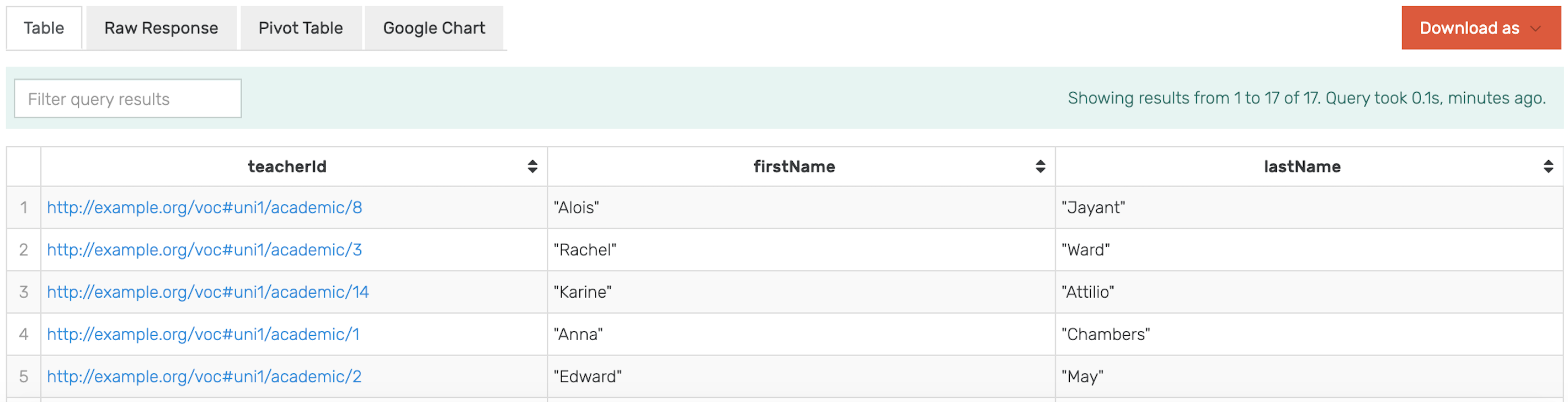
To observe the results, again in the
university-rdfrepository, execute the following query that will return the teachers that were inserted with their first and last name:PREFIX voc: <http://example.org/voc#> SELECT * { ?teacherId a voc:UniversityTeacher; voc:firstName ?firstName; voc:lastName ?lastName; }
Result:
Then:
get the teachers from the virtual repository that teach courses in an institution that is not university2
merge the result of that with the RDF repository by getting the
firstNameandlastNameof those teachers
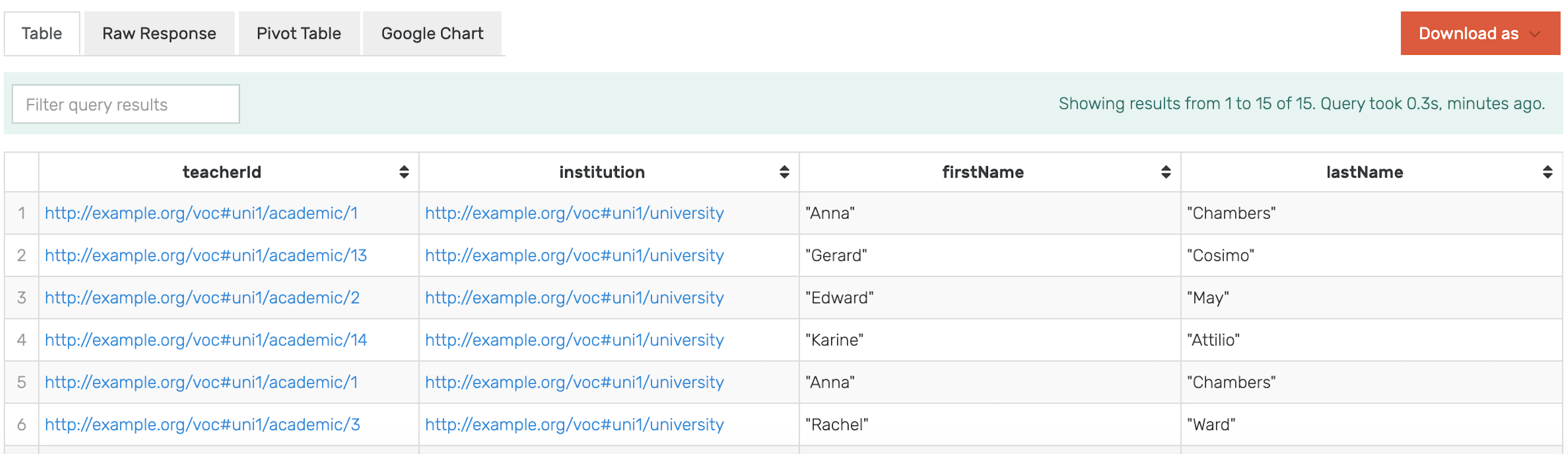
The IDs of the teachers are the common property for both repositories, which makes the selection possible. For the purposes of this demonstration, this query filters them by firstName that contains the letter “a”.
PREFIX voc: <http://example.org/voc#>

SELECT * {
    SERVICE <repository:ontop_repo> {
        ?teacherId voc:teaches [ voc:isGivenAt ?institution] .
        FILTER (?institution != "http://example.org/voc#uni2/university")
    }
    ?teacherId voc:firstName ?firstName;
               voc:lastName ?lastName
    FILTER (regex(?firstName, "a"))
}
Result:
Limitations
Data virtualization comes with certain limitations due to the distributed nature of the data. In this sense, it works best for information that requires little or no integration. For instance, if databases X and Y have two instances of the person John Smith, which do not share a unique key or other exact match attributes like “John Smith” and “John E. Smith”, it will be quite inefficient to match the records at runtime.
When using a virtual repository, keep the following in mind:
Virtual repositories are read-only, meaning that write operations cannot be executed in them
sameAs is disabled
Running an Alpine Linux Based Docker GraphDB with a DuckDB Driver will result in a Runtime Exception
GraphDB explain plan is not available
One potential drawback is also the type of supported queries. If the underlying storage has no indexes, it will be slow to answer queries such as “tell me how resource X connects to resource Y”.
The number of stacked data sources also significantly affects the efficiency of data retrieval.
Lastly, it is not possible to efficiently use auto-suggest or auto-complete indexes nor perform graph traversals or inferencing.